If your business operates in healthcare, finance, legal, or any other regulated space, adopting electronic signatures is rarely as simple as picking the first tool you find. You need a platform that meets HIPAA requirements for patient data, PCI DSS standards for payment processing, or 21 CFR Part 11 rules for FDA-related records. On top of that, the platform must be practical enough that your team can use it daily without friction. Getting this balance right matters because the wrong choice can create compliance gaps, slow down your workflows, or cost your organization more than expected at renewal time.
That is why many businesses start by comparing their options early. When you evaluate a tool like eversign esignature, you are essentially checking whether it meets your industry’s specific regulatory demands while offering the security, usability, and pricing your team needs. The goal is to find something that checks every compliance box without adding unnecessary complexity to your daily operations. A thorough evaluation upfront saves you from discovering gaps after you have already rolled the platform out across your organization.
What Compliance Standards Should an eSignature Platform Meet?
Every legitimate eSignature platform in the United States should support the ESIGN Act and UETA. These two laws give electronic signatures the same legal standing as handwritten ones, provided the platform captures consent, intent, and attribution properly through audit trails and authentication logs. Without these foundational requirements, an electronic signature may not hold up if challenged in court or during a regulatory review.
For regulated industries, the requirements go much deeper than these baseline standards. Healthcare providers need HIPAA compliance and a signed Business Associate Agreement before transmitting any protected health information through the platform. Life sciences companies require 21 CFR Part 11 compliance for electronic records and signatures used in drug development, clinical trials, and manufacturing documentation. Financial services organizations handling credit card data need PCI DSS certification to protect payment information.
A robust eSignature platform should also hold SOC 2 Type II certification, which verifies that the service provider meets strict standards for security, availability, and confidentiality. ISO 27001 certification demonstrates that information security management follows international best practices. For organizations operating across borders, alignment with GDPR, CCPA, and eIDAS frameworks ensures compliance with data privacy laws in Europe, California, and international digital transactions. When a platform carries all these certifications, it signals that security and compliance are built into the product from the ground up rather than bolted on as an afterthought.
How Does Document Security Work Across the Signing Lifecycle?
Security in eSignature starts the moment a document leaves your device and continues through every stage until it reaches long-term storage. TLS 1.2 or TLS 1.3 encryption protects files while they travel across the internet between your computer, the platform’s servers, and the recipient’s device. Without this transport-layer encryption, a document could be intercepted and read during transmission.
Once the document reaches the platform, AES-256 encryption keeps it secure at rest on the servers. This is the same encryption standard used by financial institutions and government agencies to protect classified data. Even if someone gained unauthorized access to the servers, the encrypted files would remain unreadable without the correct decryption keys.
Authentication adds another essential layer of protection. Two-factor authentication requires users to verify their identity through a second method, such as a code sent to their phone, before accessing documents or signing. This makes it significantly harder for unauthorized users to impersonate signers or tamper with documents.
Audit trails record every action taken during the signing process with precise UTC timestamps and signer identifiers. The trail captures when a document was sent, when each recipient opened it, when they applied their signature, and when the document was completed. In legal disputes, a complete audit trail can make the difference between a signature being upheld or challenged. It provides clear, timestamped evidence of who signed, when they signed, and that they went through the intended process.
What Does eSignature Look Like in Real Regulated Workflows?
In healthcare, a patient arrives for a first appointment at a new clinic. Instead of handing them a clipboard with paper forms, the front desk sends consent documents, medical history questionnaires, and HIPAA privacy notices directly to their phone or tablet. The patient reviews each document, taps to sign, and the completed forms are stored automatically with a full audit trail. No scanning, no filing cabinets, no lost paperwork. The clinic saves time on data entry, and the patient gets a faster, more convenient check-in experience. If an auditor later requests proof of consent, the clinic can produce the signed documents and audit trail within minutes.
In real estate, a property manager needs a tenant to sign a lease renewal before the current lease expires. The manager uploads the document, places signature fields on each page, and sends it through the platform with a single click. The tenant opens the email on their phone during their commute, reviews the terms, and signs in under a minute. The signed lease is stored digitally, and the audit trail records exactly when and how the signature was applied. The same workflow works for lease addenda, disclosure forms, maintenance authorizations, and closing documents.
Legal departments use these tools for contract routing and approval chains. A paralegal prepares a vendor agreement and sends it to the supervising attorney for initial review. Once the attorney signs, the document routes automatically to the client for final approval. Each person sees only the fields relevant to their role, which reduces confusion and prevents unauthorized changes. The audit trail captures the full chain of approvals from start to finish. This structured flow eliminates the endless email chains and version confusion that traditionally slow down contract handling in legal teams.
Financial services firms use eSignature for loan applications, account openings, and disclosure acknowledgments. Customers complete forms online without visiting a branch, and the platform ensures that every signed document meets regulatory recordkeeping requirements. The combination of encryption, authentication, and audit trails provides the evidence needed to satisfy both internal compliance teams and external regulators.
How Does Pricing Affect Adoption Across an Organization?
Pricing structure has a direct and measurable impact on how widely an organization adopts eSignature tools. Many vendors charge per user, which naturally discourages teams from onboarding everyone who could benefit from the technology. Some also impose envelope caps, limiting how many documents each user can send per year. These restrictions create artificial friction and force organizations to make difficult choices about who gets access rather than letting the tool spread naturally across departments.
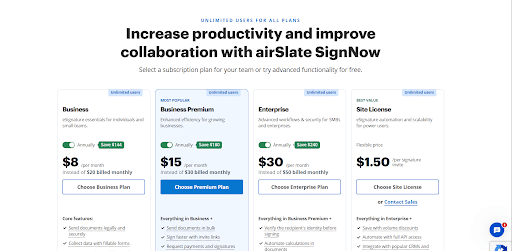
A more flexible approach starts at $8 per user per month when billed annually, with unlimited users on all paid plans and no envelope caps. This structure removes the two biggest barriers to organization-wide adoption. Teams can onboard every employee who handles documents without worrying about per-user costs adding up or hitting sending limits mid-year. There are no overage fees or surprise price increases at renewal time.
The business outcomes support the value proposition. Organizations that deploy eSignature broadly report an average ROI of 700% in the first year. Employees save up to six hours per week on document-related tasks, which adds up to significant productivity gains across large teams. Document completion rates reach 80%, meaning most documents get signed quickly rather than stalling in inboxes or requiring follow-up emails. When pricing does not get in the way, adoption happens naturally because the tool makes everyone’s work easier.
Why Do Enterprises Choose One Platform Over Another?
With 28 million users and 352 Fortune 500 companies as customers, including recognizable names like Apple, Walmart, FedEx, Tesla, and Xerox, the evidence points to a clear pattern. Enterprise organizations value platforms that combine strong compliance credentials with straightforward pricing and real-world usability. They need a tool that works out of the box, integrates with their existing CRM and storage systems, and scales as the business grows without hidden costs or contract surprises.
The platform must deliver on security promises without making everyday tasks complicated for end users. Employees should not need training to send a document for signature, and recipients should not need to create an account just to sign one form. When compliance, pricing, and usability align, adoption happens naturally because people actually want to use the tool rather than feeling forced into it. That organic adoption is what drives the productivity gains and ROI that make eSignature investments worthwhile.
FAQ
Does the ESIGN Act apply to all types of contracts? The ESIGN Act applies to most commercial, consumer, and business contracts in the United States. Certain documents like wills, family law matters, court orders, and eviction notices are excluded. For everyday business agreements, ESIGN provides full legal validity.
How long should signed documents be retained for compliance? HIPAA requires retaining signed documents for six years under 45 CFR 164.530. Other regulations may have different retention periods. Organizations should establish document retention policies based on the specific regulations that apply to their industry and consult legal counsel for guidance.
Can recipients sign documents without creating an account? Yes. Most eSignature platforms allow recipients to review and sign documents without registering or purchasing anything. They receive a signing link via email, complete the required fields on the document, and submit their signature without any setup process.
What happens if a signer later disputes their signature? The audit trail serves as the primary evidence. It shows when the document was sent, when the signer opened it, and when they applied their signature. Combined with authentication logs, this timestamped record helps establish that the signature was intentional and properly executed.
Is there a limit on how many documents a user can send? Some platforms impose per-user envelope caps that restrict how many documents each user can send per year. Others offer unlimited sending on all paid plans, removing this limitation entirely and allowing teams to scale usage freely.
What certifications should a healthcare-focused eSignature platform have? HIPAA compliance with a signed Business Associate Agreement is mandatory. SOC 2 Type II certification and ISO 27001 certification are strong indicators of enterprise-grade security. For life sciences and pharmaceutical use, 21 CFR Part 11 compliance is also essential.
How do eSignature platforms ensure documents are not tampered with? Each signed document receives a tamper-evident seal. If anyone modifies the file after signing, the seal breaks and the change is detectable. Combined with the audit trail and encryption, this ensures the integrity of the signed record